See which AI bots really read your website, and which version they got
Is ChatGPT reading your pages, and which version did its search bot fetch? Knock, knock, AI! reads your web server log and shows which AI bots (ChatGPT, Claude, Perplexity, Google and others) fetched which pages.
Think Search Console, but for AI bots.
A log line gives you a bot name, an IP address and a response size. The app checks the address against the list the bot's provider publishes and works out page versions from the sizes. All of it runs on your own server, from your own logs.
Free. One PHP folder, PHP 8.2 or newer, no database. Built for site owners, SEO specialists and agencies.
What each view tells you
The panel opens in your browser behind a password. Its menu has six views, and each answers one question.
- Visits:
- which bots read which pages. The tab "Bots" draws a line for each bot, the five with the most visits at first.
- Access:
- whether bots can enter your home page.
- Freshness:
- the Knock Score and how fresh the whole site is for the bots.
- Traffic from AI (beta):
- how many people arrive from AI answers, with a chart, the pages and the list of arrivals.
- Pages:
- how each page from your sitemap looks, with freshness, filters, groups and a CSV download.
- Errors:
- which addresses return an error to the bots, and how to fix it.
- Page:
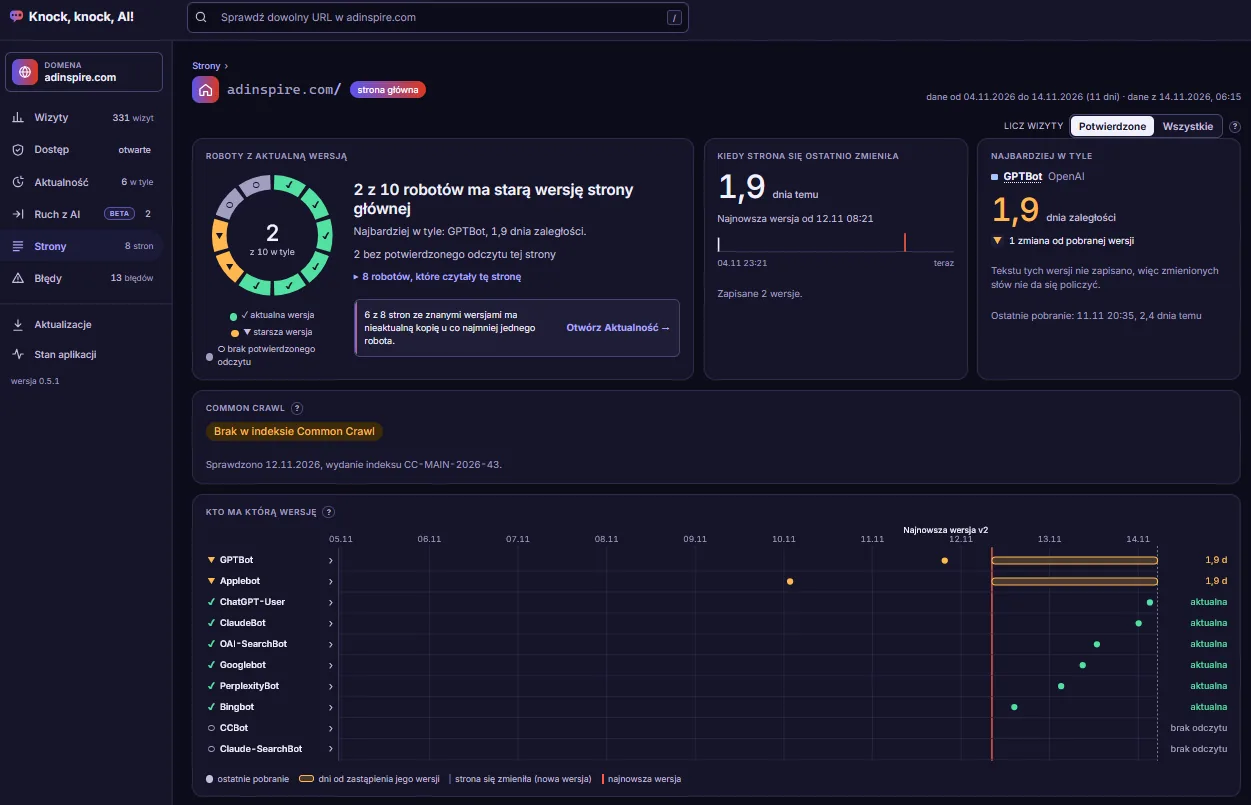
- whether bots have the current version of one page. It has no menu entry: you open it from the address field or from a row in Pages.
Traffic from AI is in beta. It counts the arrivals of people from answers of ChatGPT, Perplexity, Gemini, Copilot, Claude and others, by utm_source or the referer, and collects from the day of installation.
Type any URL into the "check any URL" field in the top bar and the Page view opens for it. The view sits in the address after #, so a link opens the same view again. The list in Pages downloads as CSV that opens correctly in Excel.
The app reads Apache and nginx logs, plain or gzip, and recognises the format on its own. The interface speaks English and Polish.
See the panel live
The demo is the real panel of this website, knockknock-ai.app, with data from its own server logs. It opens without a login and is read-only: you cannot change anything in it.
Upload, create an account, set up recalculation
- Upload the folder. Put the app folder on your domain's server and open its address. The app creates its data folder, closed to the internet, on its own.
- Create the account. You have 60 minutes from the first opening. Pick a login, a password of at least 12 characters and a language.
- Add the cron job, or choose to work without cron. Your hosting's cron calls the app's address. When the app cannot read the log itself, cron also copies it into the app folder. The app writes the script and shows what to enter in your hosting panel. Hosting without cron? Choose "Without cron" and recalculate the data with the button "Recalculate now".
Seven steps in the browser (six without cron or with uploaded log files) walk you through it: Account, Server, Logs, Cron, Check, Schedule, Domains. The app first tries to read your log directly. When your hosting does not allow it, cron copies the log, or the app fetches it over SFTP or FTP, or you download the log files from your hosting panel and upload them in the app by hand. Have only an FTP client? The install guide has a separate path for installing over FTP. The docs estimate about a quarter of an hour.
After that the panel refreshes after each recalculation, usually twice a day from cron. The target schedule is 6:17 and 18:17 every day. For a manual run, click "Recalculate now". Without cron the data are counted only after that click, so recalculate at least once a week. Until the first bot visit arrives, the status page is your home page.
A real bot, or just a name?
A visit announces a name in its User-Agent, and the app finds the bot by a token in it. The User-Agent only tells you what the visit calls itself.
So the app compares the visit's IP address with the list the bot's provider publishes. Every visit lands in one of three states:
- Confirmedthe IP address is on the provider's list.
- Unconfirmedit is not. A possible fake.
- No listthe provider publishes no usable list, so nothing can be checked.
The app fetches the lists at most once a day and sends no DNS queries. For eleven bots, Amazonbot and Bytespider among them, no list exists today.
Does the bot have your current version?
Freshness answers one question: did the bot read the current version of the page, or an older one? The Page view shows it for one page, Pages shows it as a bar for every page, and the Freshness view sums it up for the whole site. For each bot on a page the panel shows one of three states: current, older ("N versions back" or "before the measurement"), or no confirmed read. When it cannot tell, it says so.
For a bot that is behind, the panel shows what changed since its read: how many words you added and removed, plus the changed lines (up to 40 lines of 300 characters). It sets no threshold for a "minor change".
The app is not certain about versions, and says so. Versions come from response sizes in the log. On a static site with page files in the folder above the app, they also come from the page texts. Without texts, two versions of the same size look identical. WordPress and other dynamic sites have no texts, so their versions come from sizes only. When the versions do not explain a page's responses, the panel marks the page as unstable and calculates no freshness for it. A new version of a page becomes known only at the first response to it, so freshness runs behind your change.
The panel shows the latest version this bot fetched, not what the model knows.
Can the bots get in at all?
The Access tab checks your home page through api.adinspire.com. It reads what robots.txt says, runs a test with bot names, and looks for the page in Common Crawl. Common Crawl is checked only for the main domain of the installation: the free version checks the home page and up to 19 of your most visited pages, 20 addresses in total. A check usually takes 10 to 20 seconds. You get 3 Access checks per day per installation.
These two checks need the api.adinspire.com service, and so does the check for updates. Everything else in the app works without it.
Knock Score in one paragraph
Knock Score is a number from 0 to 100: for how many of your pages each AI platform fetched the current version. Only the search bot of each platform counts, not its user bot or its training bot. The number measures fetching by bots. A fetch does not guarantee that the page gets used, and the score says nothing about what a model knows or will answer.
What the app will not see
A log holds only what reached your server, so some things stay out of view.
- Cloudflare blocks and answers served from cache never reach your server, so they are not in the log.
- Many servers keep logs for about 7 days. A visit that left the log before the app read it (cron copied it or you clicked "Recalculate now") does not come back.
- Conditional headers (
If-Modified-Since,If-None-Match) stay invisible. You see only their effect, status code 304. - If your server logs the address of a proxy (a CDN, for example) instead of the visitor's, real bots look unconfirmed.
- When the oldest log line is newer than the newest one seen before, the status page tells you which period may have lost visits.
Your data stays on your server
Visits, settings and the panel live in a data folder with a random name on your server. The app closes that folder to the internet. When the app copies or downloads your logs, or you upload log files, the folder holds the copies with IP addresses (with direct reading it holds none). An uploaded file is deleted 14 days after the app read it to the end. It holds stored bot visits with IP, User-Agent and referer. People are not stored as bot visits. The panel files carry no ip, user_agent or referer fields.
One exception: the beta feature Traffic from AI stores the arrivals of people from AI answers. It keeps the time, the page address without parameters, the platform and the trace that matched, with no IP address and no User-Agent.
What goes out to api.adinspire.com: your home page address, up to 19 other addresses for the Common Crawl check, the panel language and an installation identifier. The check for a new version sends the version number of the app, the installation identifier and the domain of your site (you can switch the domain off on the Updates screen), and runs only on a public address. Nothing from your logs goes out, no visitor IPs and no User-Agents.
The app keeps stored bot visits for 13 months. Once a day it deletes the visit files older than 13 calendar months by itself, also in the folders of the other domains.
Free, and what you need
Free. Knock, knock, AI! is free to install and use on your own websites and on the websites of your clients, under the Free Use Licence. You may not sell it, distribute a modified version or publish it under a different name. A PRO version is planned.
You need:
- PHP 8.2 or newer, with the extensions json, hash, zlib, session and pcre
- write permission in the app folder
- preferably cron in your hosting panel (the app does not set it up, it shows you what to enter); it works without cron too, and you then count the data with the button "Recalculate now"
- access to the access log file of the server (the app reads it directly, or cron copies it, or the app fetches it over SFTP or FTP), or log files that you download from your hosting panel and upload by hand
HTTPS on the app's address is recommended, because over plain http the panel password travels in clear text.
The Cron step gives ready values for lh.pl, cPanel, DirectAdmin and other hosting (a crontab line).
Who is behind it
Maciej Chmurkowski is the author. Adinspire is the publisher. Write to [email protected].
See who reads your site
A free PHP app in one folder on your server. It shows which AI bots read your pages, from your own logs. Upload the folder, click through seven steps, then wait for the first bot visit.